> ## Documentation Index
> Fetch the complete documentation index at: https://docs.trysidebar.ai/llms.txt
> Use this file to discover all available pages before exploring further.
# Skills Store
{/* TODO: alt text — replace with a rich, specific description of what's shown (for screen readers and AI crawlers) */}
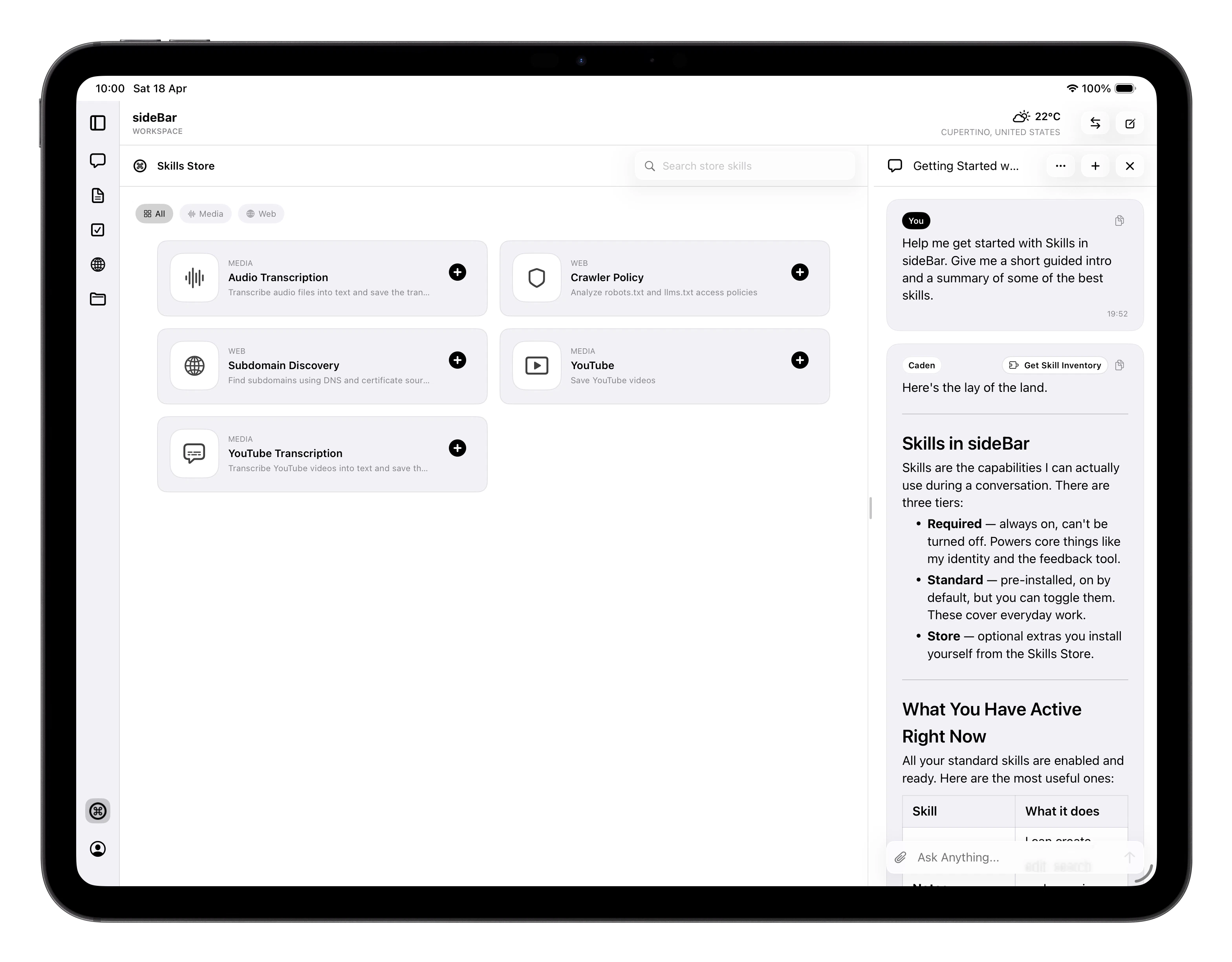 The Skills Store is where you discover and install new skills for
sideBar. It's a dedicated section of the app which you can find in the
navigation alongside Chat, Notes, Tasks, Websites, and Files.
See [Skills](/manual/skills) for an explanation of what skills are and how
they work.
## Browsing the Store
Skills are organised by category — Audio, Media, Web, Developer, and more.
Use the category filter at the top to narrow the list, or search by name
to find something specific. Tap any skill card to see its full description,
requirements, and version details.
## Installing a Store Skill
1. Tap a skill to open its detail view.
2. Review the description and requirements.
3. If the skill needs an API key from an external service, enter it when
prompted. Your key is encrypted before being stored. Only the last four
characters are shown after saving and the full key is never displayed again.
4. Tap **Install**. The skill is available to sideBar immediately.
Once installed, sideBar will use the skill automatically when it's relevant,
you don't need to invoke it by name.
## Managing Installed Skills
After installation, your Store skills are managed from
[Settings](/manual/settings) → **Skills**, not from the Store itself. From
there you can:
* **Enable or disable** the skill with a toggle
* **Update the API key** if your credentials change
* **Uninstall** the skill. This removes it and deletes its credentials from
your account
Disabling a skill keeps it installed but stops sideBar from using it. You can
re-enable it at any time without reinstalling.
The Skills Store is where you discover and install new skills for
sideBar. It's a dedicated section of the app which you can find in the
navigation alongside Chat, Notes, Tasks, Websites, and Files.
See [Skills](/manual/skills) for an explanation of what skills are and how
they work.
## Browsing the Store
Skills are organised by category — Audio, Media, Web, Developer, and more.
Use the category filter at the top to narrow the list, or search by name
to find something specific. Tap any skill card to see its full description,
requirements, and version details.
## Installing a Store Skill
1. Tap a skill to open its detail view.
2. Review the description and requirements.
3. If the skill needs an API key from an external service, enter it when
prompted. Your key is encrypted before being stored. Only the last four
characters are shown after saving and the full key is never displayed again.
4. Tap **Install**. The skill is available to sideBar immediately.
Once installed, sideBar will use the skill automatically when it's relevant,
you don't need to invoke it by name.
## Managing Installed Skills
After installation, your Store skills are managed from
[Settings](/manual/settings) → **Skills**, not from the Store itself. From
there you can:
* **Enable or disable** the skill with a toggle
* **Update the API key** if your credentials change
* **Uninstall** the skill. This removes it and deletes its credentials from
your account
Disabling a skill keeps it installed but stops sideBar from using it. You can
re-enable it at any time without reinstalling.