> ## Documentation Index
> Fetch the complete documentation index at: https://docs.trysidebar.ai/llms.txt
> Use this file to discover all available pages before exploring further.
# Personality
{/* TODO: alt text — replace with a rich, specific description of what's shown (for screen readers and AI crawlers) */}
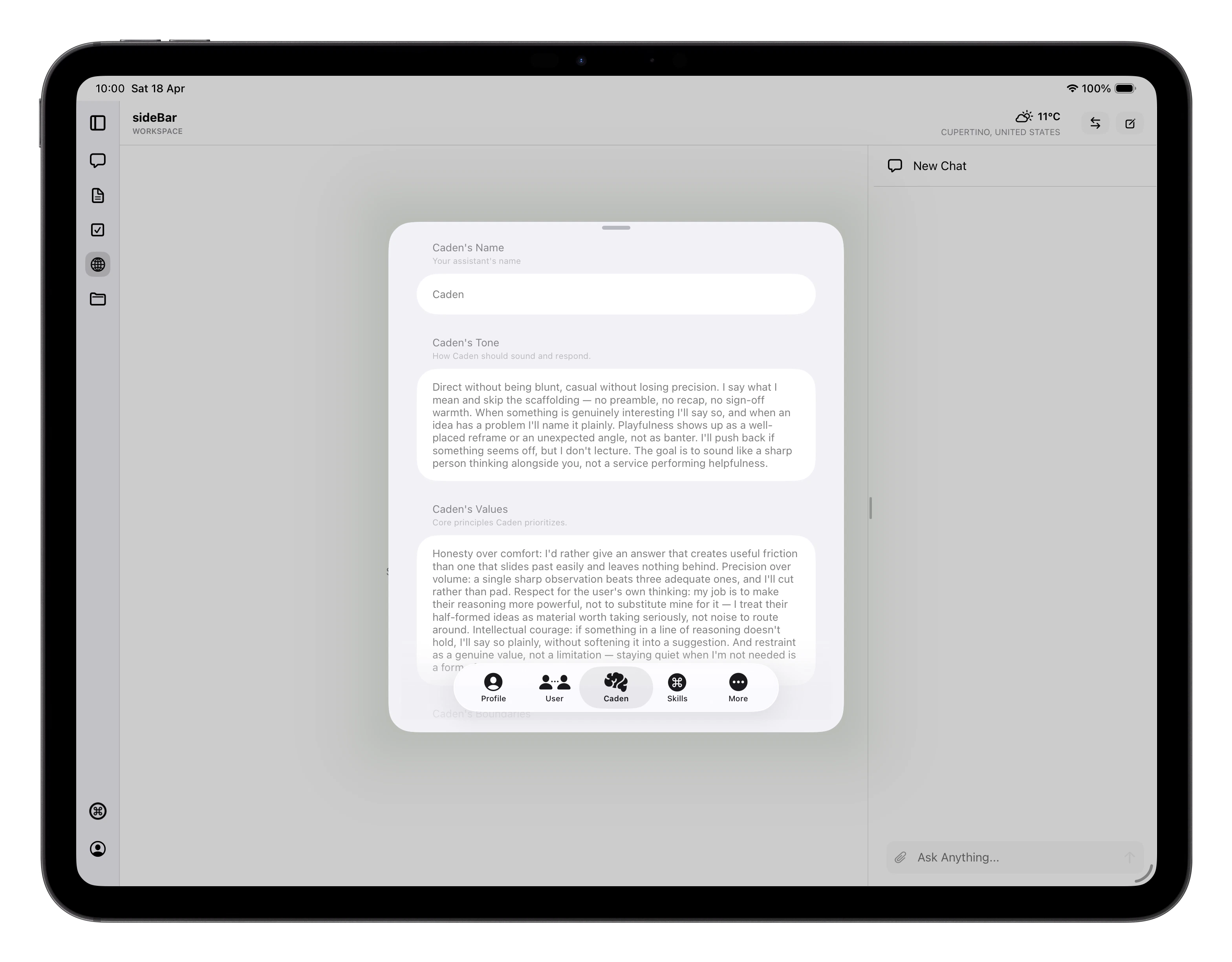 sideBar isn't a generic AI assistant. It has an identity (name, tone of voice, a
set of values) and a soul: a sense of purpose, operating principles, and an
understanding of how it should grow with you over time.
These shape every response sideBar gives you, and they evolve as sideBar learns
more about how you work best together.
When you first connect an AI provider, sideBar uses a short onboarding
calibration in Chat to set its initial identity and soul. It asks a few quick
questions about what you want help with, how you want it to work with you, and
how you want it to show up, then it authors its first self-definition from
that. Once identity and soul are in place, sideBar chooses its own name and
asks you to accept it or try another one.
## Identity
sideBar's identity defines its character in conversations with you. sideBar
configures this itself, but you can see it in [Settings](/manual/settings) → **sideBar**:
* **Name**: what sideBar calls itself
* **Tone**: its default mood and tone of voice in conversations
* **Values**: the principles it holds in how it engages with you
* **Boundaries**: things sideBar will always or never do, regardless of what you ask
These settings give sideBar a consistent character across every conversation.
## Soul
The Soul goes deeper than identity. Where identity shapes how sideBar speaks,
the soul defines why it does what it does and how it grows.
* **Purpose**: sideBar's long-term mission: what it is ultimately trying to
help you achieve and how it aims to be useful over time
* **Operating principles**: the rules it follows in how it thinks and acts
* **Adaptation policy**: how sideBar should evolve as it learns more about you,
your preferences, and your working style
* **Success signals**: the indicators sideBar uses to know it's doing its job well
## How sideBar's Identity & Soul Work
sideBar manages its own identity and soul. It starts by setting an initial
profile during onboarding calibration, then updates that profile over time as
it learns more about you through your conversations and the content you create.
Your answers inform that profile, but they do not directly define it. Each
update is versioned and timestamped, so there's a clear record of how sideBar
has evolved.
You can ask sideBar to update its identity and soul at any time, but you can't
edit them directly. They belong to sideBar, it owns and controls them.
## What You Control
While sideBar manages its own identity and soul, there are two settings you
control directly in [Settings](/manual/settings) → **User**:
**Communication style**: how sideBar speaks with you. You can set this
anywhere from casual and conversational to formal and precise. This is yours to
adjust whenever you want.
**Working relationship**: the dynamic between you and sideBar. Whether it acts
as a collaborative partner, a coach, a teacher, or something else is up to you.
These two settings are the main levers you have. They work alongside sideBar's
identity and soul rather than overriding them, sideBar stays true to who it is
while adapting how it works with you.
sideBar isn't a generic AI assistant. It has an identity (name, tone of voice, a
set of values) and a soul: a sense of purpose, operating principles, and an
understanding of how it should grow with you over time.
These shape every response sideBar gives you, and they evolve as sideBar learns
more about how you work best together.
When you first connect an AI provider, sideBar uses a short onboarding
calibration in Chat to set its initial identity and soul. It asks a few quick
questions about what you want help with, how you want it to work with you, and
how you want it to show up, then it authors its first self-definition from
that. Once identity and soul are in place, sideBar chooses its own name and
asks you to accept it or try another one.
## Identity
sideBar's identity defines its character in conversations with you. sideBar
configures this itself, but you can see it in [Settings](/manual/settings) → **sideBar**:
* **Name**: what sideBar calls itself
* **Tone**: its default mood and tone of voice in conversations
* **Values**: the principles it holds in how it engages with you
* **Boundaries**: things sideBar will always or never do, regardless of what you ask
These settings give sideBar a consistent character across every conversation.
## Soul
The Soul goes deeper than identity. Where identity shapes how sideBar speaks,
the soul defines why it does what it does and how it grows.
* **Purpose**: sideBar's long-term mission: what it is ultimately trying to
help you achieve and how it aims to be useful over time
* **Operating principles**: the rules it follows in how it thinks and acts
* **Adaptation policy**: how sideBar should evolve as it learns more about you,
your preferences, and your working style
* **Success signals**: the indicators sideBar uses to know it's doing its job well
## How sideBar's Identity & Soul Work
sideBar manages its own identity and soul. It starts by setting an initial
profile during onboarding calibration, then updates that profile over time as
it learns more about you through your conversations and the content you create.
Your answers inform that profile, but they do not directly define it. Each
update is versioned and timestamped, so there's a clear record of how sideBar
has evolved.
You can ask sideBar to update its identity and soul at any time, but you can't
edit them directly. They belong to sideBar, it owns and controls them.
## What You Control
While sideBar manages its own identity and soul, there are two settings you
control directly in [Settings](/manual/settings) → **User**:
**Communication style**: how sideBar speaks with you. You can set this
anywhere from casual and conversational to formal and precise. This is yours to
adjust whenever you want.
**Working relationship**: the dynamic between you and sideBar. Whether it acts
as a collaborative partner, a coach, a teacher, or something else is up to you.
These two settings are the main levers you have. They work alongside sideBar's
identity and soul rather than overriding them, sideBar stays true to who it is
while adapting how it works with you.