> ## Documentation Index
> Fetch the complete documentation index at: https://docs.trysidebar.ai/llms.txt
> Use this file to discover all available pages before exploring further.
# Introduction
{/* TODO: alt text — replace with a rich, specific description of what's shown (for screen readers and AI crawlers) */}
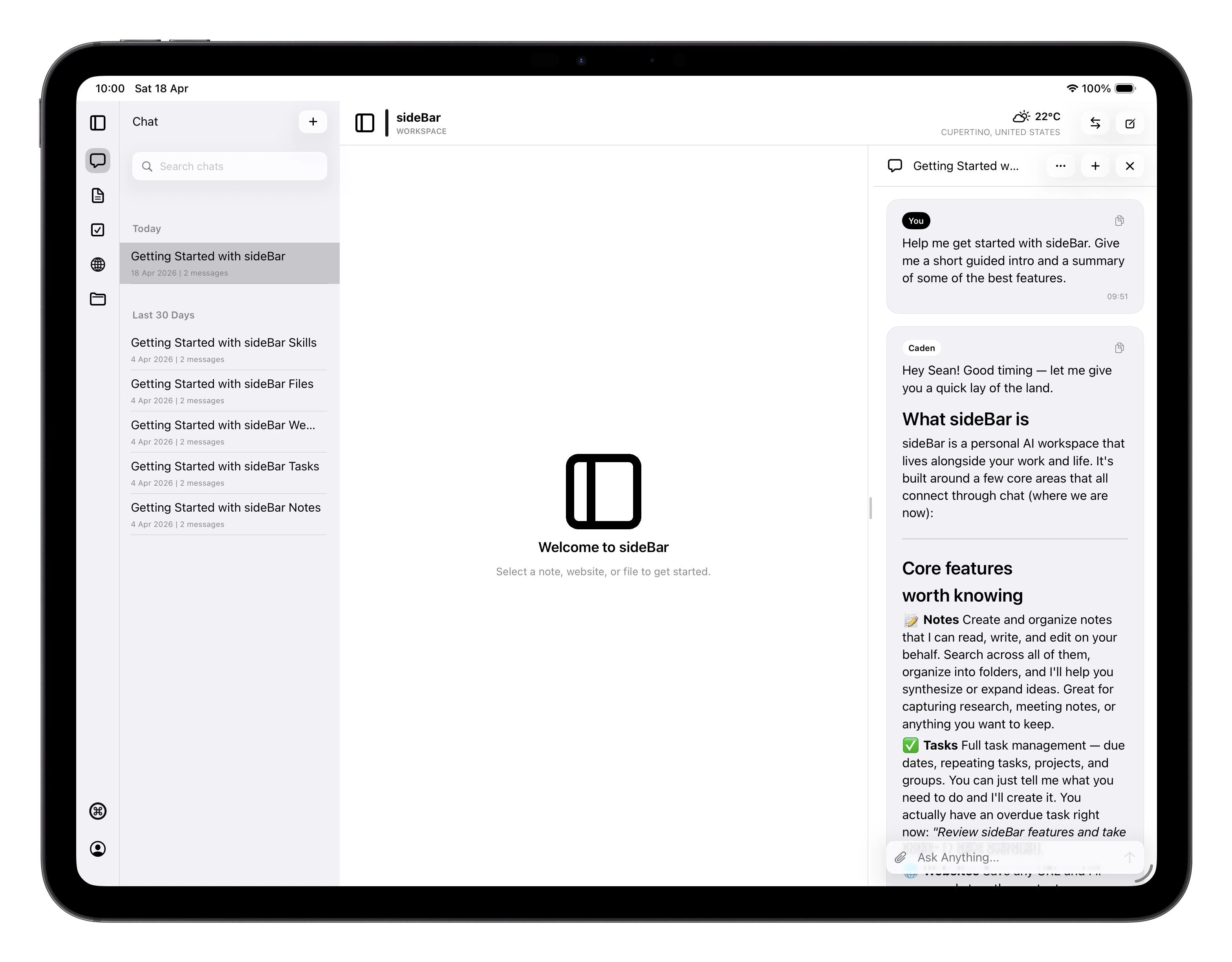 sideBar is an AI assistant available on iPhone, iPad, Mac, and in your
web browser. It gives you a single place to take notes, manage tasks,
save websites, and work with files, all with an AI assistant that can help
you get things done.
The core idea is that your content and sideBar live together. When you
ask sideBar a question, it can pull from your notes, check your tasks, or
browse the web on your behalf, without you having to switch between apps or copy
things around.
sideBar also has its own identity and soul: a name, a tone, values, and a sense
of purpose that evolves as it learns more about how you work. It's not a generic
AI chat interface, it's an assistant that adapts to you over time.
## What's in the App
* **[Chat](/manual/chat)**: your main interface with sideBar. Ask questions,
give instructions, or just think out loud.
* **[Notes](/manual/notes)**: a full-featured editor for capturing and
organising your writing.
* **[Tasks](/manual/tasks)**: a lightweight to-do system both you and sideBar
can use, with project-based organisation.
* **[Websites](/manual/websites)**: saved webpages sideBar can read and
reference.
* **[Files](/manual/files)**: documents and files you want sideBar to work
with.
* **[Skills Store](/manual/skills-store)**: browse and install additional
capabilities to extend what sideBar can do.
## Skills
[Skills](/manual/skills) extend what sideBar can do. Settings organises them
into Included and Store skills:
* **Included skills** come with sideBar. Some are optional and can be turned
on or off. Core included skills are locked on because sideBar depends on them.
* **Store skills** are additional capabilities you can install yourself from the
[Skills Store](/manual/skills-store). Examples include transcribing YouTube
videos and integrations with services like Gmail and Spotify.
## Keyboard Shortcuts
sideBar supports keyboard shortcuts throughout the app on iPad and Mac.
Press **Cmd+Shift+/** at any time to see all available shortcuts for the
current view.
Universal shortcuts available everywhere:
| Shortcut | Action |
| ------------------- | ------------------------ |
| Cmd+1 through Cmd+6 | Navigate to each section |
| Cmd+N | New item |
| Cmd+F | Search |
| Cmd+, | Open Settings |
| Cmd+W | Close |
| Cmd+R | Refresh |
| Cmd+Shift+O | Open Scratchpad |
| Cmd+Shift+S | Toggle sidebar |
| Cmd+Shift+/ | Show all shortcuts |
Each section has additional shortcuts listed at the bottom of its page in
this manual.
## Where to Start
Head to [Getting Started](/manual/getting-started) for a walkthrough of setup
and first steps. The rest of this manual covers each section of the app in
detail.
sideBar is an AI assistant available on iPhone, iPad, Mac, and in your
web browser. It gives you a single place to take notes, manage tasks,
save websites, and work with files, all with an AI assistant that can help
you get things done.
The core idea is that your content and sideBar live together. When you
ask sideBar a question, it can pull from your notes, check your tasks, or
browse the web on your behalf, without you having to switch between apps or copy
things around.
sideBar also has its own identity and soul: a name, a tone, values, and a sense
of purpose that evolves as it learns more about how you work. It's not a generic
AI chat interface, it's an assistant that adapts to you over time.
## What's in the App
* **[Chat](/manual/chat)**: your main interface with sideBar. Ask questions,
give instructions, or just think out loud.
* **[Notes](/manual/notes)**: a full-featured editor for capturing and
organising your writing.
* **[Tasks](/manual/tasks)**: a lightweight to-do system both you and sideBar
can use, with project-based organisation.
* **[Websites](/manual/websites)**: saved webpages sideBar can read and
reference.
* **[Files](/manual/files)**: documents and files you want sideBar to work
with.
* **[Skills Store](/manual/skills-store)**: browse and install additional
capabilities to extend what sideBar can do.
## Skills
[Skills](/manual/skills) extend what sideBar can do. Settings organises them
into Included and Store skills:
* **Included skills** come with sideBar. Some are optional and can be turned
on or off. Core included skills are locked on because sideBar depends on them.
* **Store skills** are additional capabilities you can install yourself from the
[Skills Store](/manual/skills-store). Examples include transcribing YouTube
videos and integrations with services like Gmail and Spotify.
## Keyboard Shortcuts
sideBar supports keyboard shortcuts throughout the app on iPad and Mac.
Press **Cmd+Shift+/** at any time to see all available shortcuts for the
current view.
Universal shortcuts available everywhere:
| Shortcut | Action |
| ------------------- | ------------------------ |
| Cmd+1 through Cmd+6 | Navigate to each section |
| Cmd+N | New item |
| Cmd+F | Search |
| Cmd+, | Open Settings |
| Cmd+W | Close |
| Cmd+R | Refresh |
| Cmd+Shift+O | Open Scratchpad |
| Cmd+Shift+S | Toggle sidebar |
| Cmd+Shift+/ | Show all shortcuts |
Each section has additional shortcuts listed at the bottom of its page in
this manual.
## Where to Start
Head to [Getting Started](/manual/getting-started) for a walkthrough of setup
and first steps. The rest of this manual covers each section of the app in
detail.